
Mailcow:dockerized relies heavily on certificates with multiple names (SAN, Subject Alternative Name). This limits the choice of ACME providers, especially free ones. Here is way to change to a European Certificate Authority (CA).
Mailcow: dockerized is a comfortable, modern, and full-featured open source email suite supported by a German company. As such, it is an important piece for digital sovereignty and a key component in my self-hosted system for about a dozen friends and family.
The certificate challenge
However, the default setup has two disadvantages, both related to certificates:
- The certificates mailcow requests are issued by Let’s Encrypt.
- The certificates mailcow requests are multi-SAN certificates.
Let’s look at both issues:
Let’s Encrypt
While Let’s Encrypt allowed one of the most influential steps in making today’s Internet more secure, it also is an organization falling under U.S. jurisdiction. Since the Trump inauguration, several European individuals and organizations have fallen under U.S. sanctions, for reasons which seem to be politically motivated. It seems that sanctions can befall anyone at any time who is randomly disliked by the current U.S. president or administration on a particular day.
So, it is important to have some alternatives.
ACME Multi-SAN Certificates
ACME (Automatic Certificate Management Environment) is the Internet protocol that powered the HTTPS-everywhere revolution, most widely associated with Let’s Encrypt. It allows for automatic certificate requests and renewals. If you have set it up once, you do not need to worry about certificates anymore.
Unless — there is a reason that the preconditions for requesting or renewing the certificate have disappeared. For example, if the web server stops responding to a particular request. Or you forgot to renew the domain. Or there is a misconfiguration of the DNS servers. Or, or, or.
For a single certificate serving a single purpose, this is bad. But there, the failure of the certificate renewal often only is the second step. The root cause typically lies in the service itself having failed. And, obviously, if the service is unavailable, it does not matter much whether it is unavailable with or without a valid certificate.
Certificates serving multiple names, for example, mail.example.com, mail.beispiel.li, and mail.exemple.ch, if any of the domains is in trouble when reissuing the certificate, the entire certificate is not renewed at all. I.e., there is no graceful degradation.
So, when multiple domains and multiple services are verified by a single certificate, the impact of a failure is multiplied by the number of sources of error. If you are like me and have about two dozen domains for the one dozen users, there is plenty of potential for failure. (And yes, I have been bitten by several of them, especially unregistering domains.)
Graceful degradation would happen if each service and each host name had their own certificate. However, this is not the default operation of mailcow.
Solving Two At One Blow
If there is a solution to splitting the certificates, amazingly, also the number of (free) ACME CAs increases.
Understanding mailcow Certificates
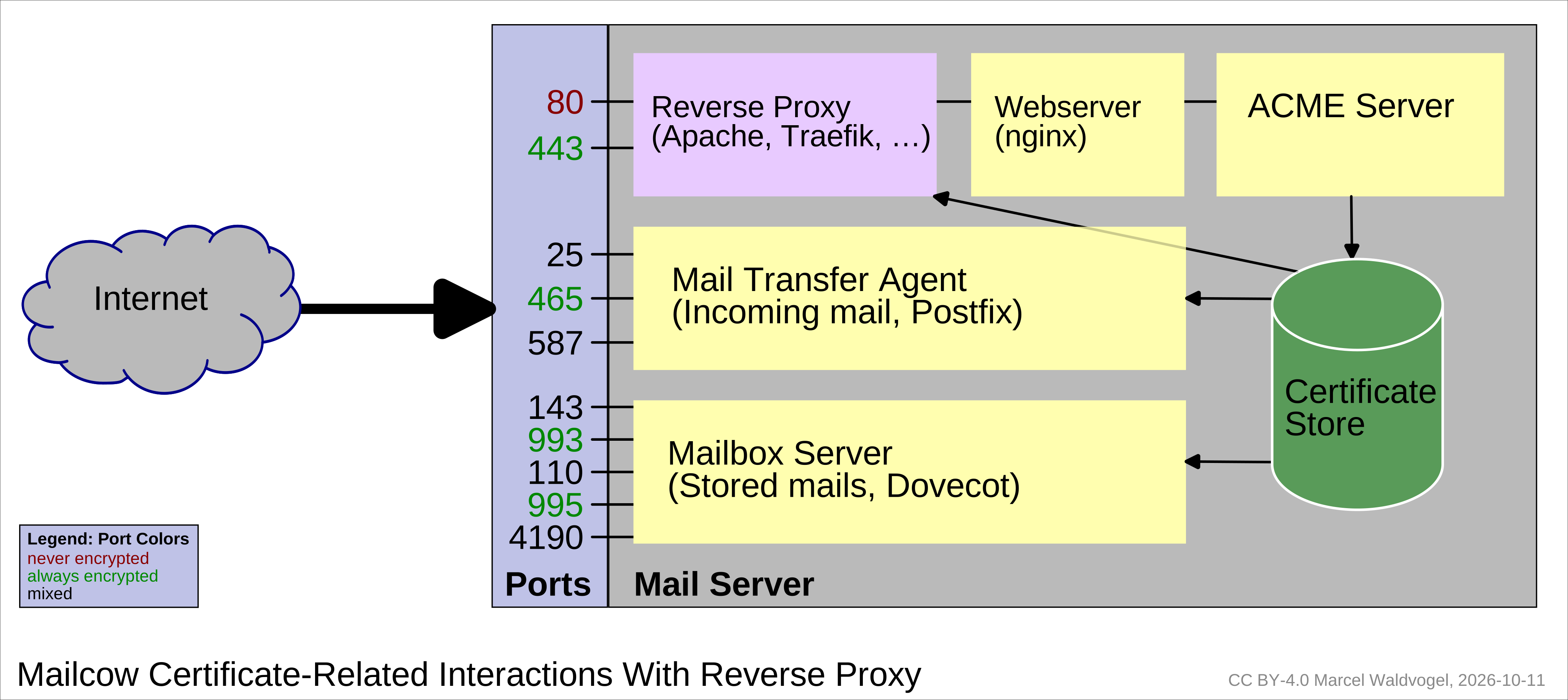
Mailcow uses certificates for multiple purposes, most notably:
- To provide HTTPS support for the website(s) on which users can use the SOGo webmail and where administrators can configure mailcow (e.g.
mail.beispiel.liabove). - To provide HTTPS to various auto-configuration web domains which modern clients use behind the scenes when setting up a user account (e.g.
autodiscover.beispiel.li). - To provide TLS encryption when sending and receiving mail to/from your mail application, i.e. for the IMAP and SMTP protocols (co-located on
mail.beispiel.lior separated out onimap.beispiel.liandsmtp.beispiel.li).
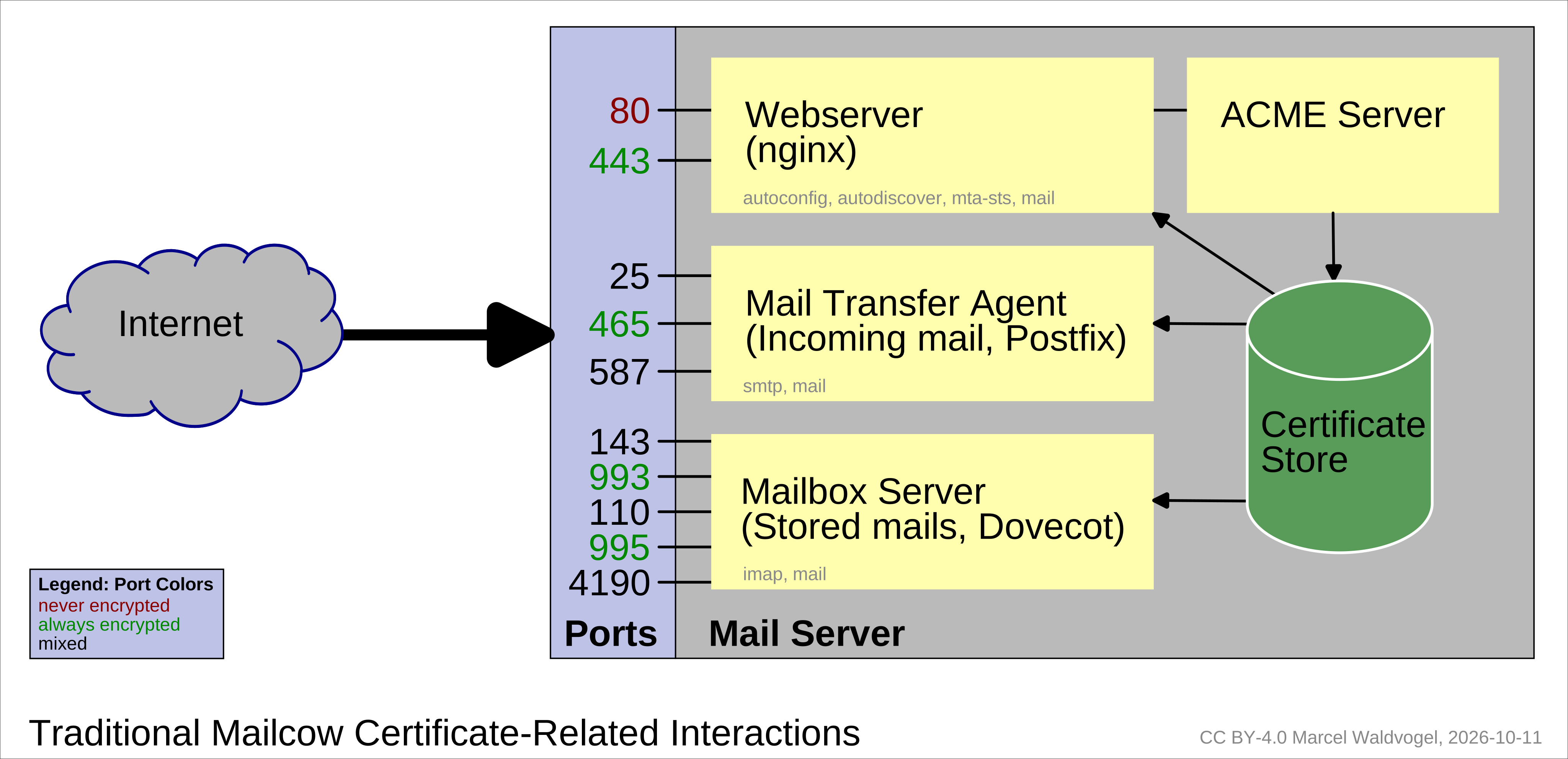
If you host multiple mail domains, some or all of the names are repeated on the other domains. Quite a few certificates to manage. So automation is key.
Why Multi-SAN Certificates?
In the very early days of encrypted connections, the client did not have a way to indicate which server name it wanted to talk to, before actually setting up the encrypted connection. A mechanism for this, Server Name Indication or SNI, was already standardized in 2003, but did take a few years to become widely used. Web browsers did take 3 to 5 years before they supported it, many other web tools (command line tools and client libraries) took even longer. Adoption among mail servers and mail clients was even later, with some of them only starting support in mid-to-late 2010’s.
It should come as no surprise that a mail server like mailcow still follows the multi-SAN certificate style which was the only way to achieve wide encryption support before all mail clients and servers fully supported SNI.
Caddy Simplifies Certificates
A few months ago, I fell in love with the Caddy web server: It provides sane defaults, so configuring a modern website is often just 3 lines, even with HTTPS support and HTTP-to-HTTPS redirect. Still, you can configure pretty much everything you want, and most often not more complicated than with other web servers.
Caddy comes with built-in automatic ACME certificate management, so the administrator is free from being bothered with certificates. Also, for simplicity and flexibility, Caddy requests one certificate per host name (unless you insist otherwise).
By placing Caddy as a reverse proxy for these domains, Caddy will handle the entire certificate lifecycle. To make the setup work as desired, the following steps are required:
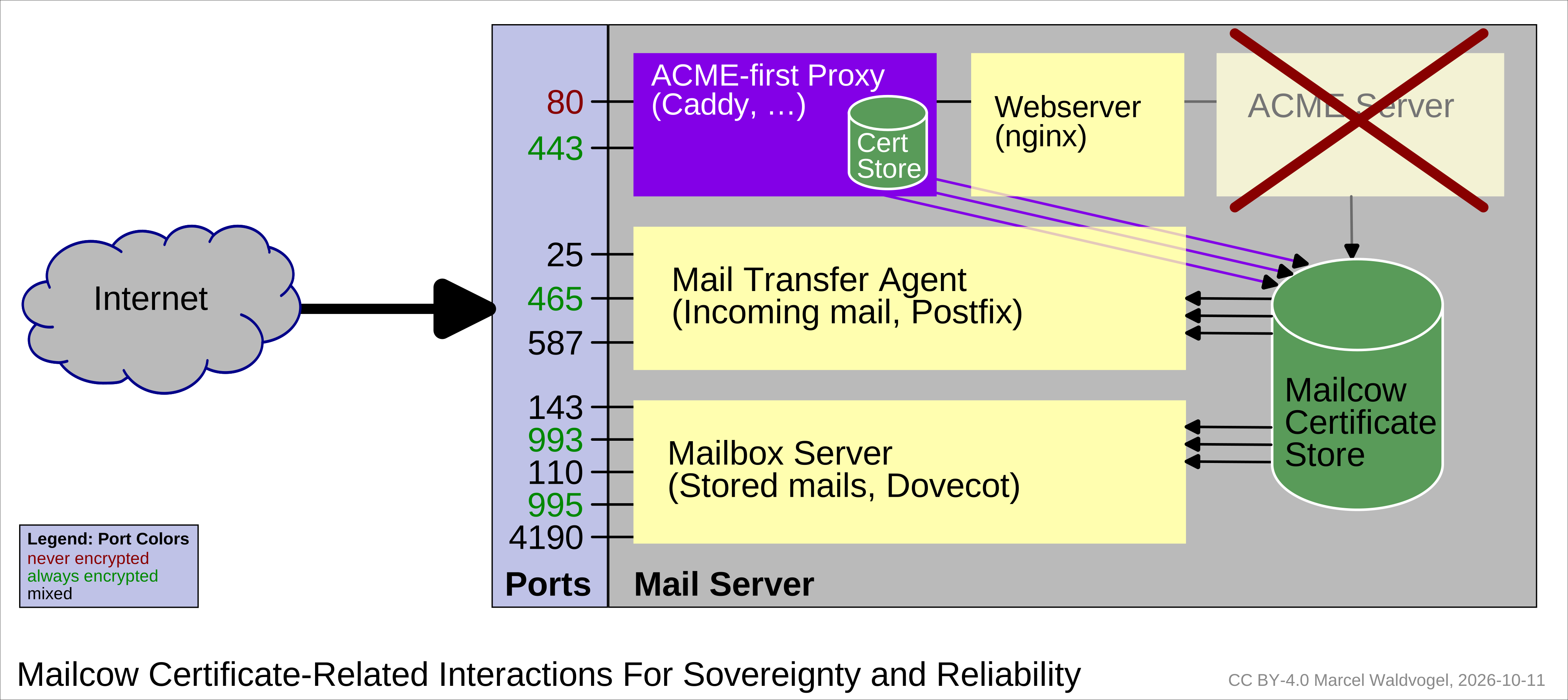
- Create a Caddyfile (Caddy configuration) with all the names any of the services should listen to (and obtain certificates for).
- Create a script to copy changed Caddy certificates to the mailcow certificate directory
- Configure Postfix to use the new certificates
- Configure Dovecot to use the new certificates
- Disable the mailcow Let’s Encrypt ACME container
1. Create a Caddyfile
This creates the Caddyfile snippet that will teach Caddy about all your mailcow-related domains and proxy them to where your real mailcow sits (as configured by HTTP_PORT variables and friends).
# This is config.sh in the same directory as all the other scripts

# The hostnames (prefixes), will probably not need to change
hosts=(autodiscover autoconfig mail smtp imap mta-sts)

# The domains you handle mail for, change to your needs
domains=(example.ch example.li example.de)

# The main hostname your mail server listens to, change to your needs
MAILCOW_HOSTNAME="mail.example.ch"

# The default location if you configured Actalis as your ACME server
#CADDY_CERTS_DIR=/var/lib/caddy/.local/share/caddy/certificates/acme-api.actalis.com-acme-directory
# The Let's Encrypt (default) case or change according to your needs
CADDY_CERTS_DIR=/var/lib/caddy/.local/share/caddy/certificates/acme-v02.api.letsencrypt.org-directory/

# The base directory of your mailcow setup, change according to your needs
MAILCOW_BASE=/opt/docker/mailcow-dockerized

# The mailcow certificate store
MAILCOW_SSL="${MAILCOW_BASE}/data/assets/ssl"
#!/bin/bash
. config.sh
for i in "${hosts[@]}"; do
for j in "${domains[@]}"; do
echo -n "$i.$j, "
done
done | sed 's/, $/ {/'
echo
echo " reverse_proxy http://127.0.0.1:10080" # Or wherever your mailcow web server listens
echo "}"This will create the following output. You can keep this as a standalone Caddyfile to run Caddy with, or integrate it into your existing Caddyfile.
autodiscover.example.ch, autodiscover.example.li, autodiscover.example.de, autoconfig.example.ch, autoconfig.example.li, autoconfig.example.de, mail.example.ch, mail.example.li, mail.example.de, smtp.example.ch, smtp.example.li, smtp.example.de, imap.example.ch, imap.example.li, imap.example.de, mta-sts.example.ch, mta-sts.example.li, mta-sts.example.de {
  reverse_proxy http://127.0.0.1:10080
}
As usual, Caddy will automatically obtain the ACME certificates and perform the HTTP→HTTPS redirect, no configuration required.
2. Certificate copy script
This is the copying script; do not run it yet, we need to first prepare the mail servers.
#!/bin/bash
. config.sh

# Copies the cert for $1=hostname from Caddy to Mailcow, possibly also as main cert
copy_cert() {
	mkdir -p "${MAILCOW_SSL}/$1/"
	echo "$1" > "${MAILCOW_SSL}/$1/domains"
	cp "${CADDY_CERTS_DIR}/$1/$1.crt" "${MAILCOW_SSL}/$1/cert.pem"
	cp "${CADDY_CERTS_DIR}/$1/$1.key" "${MAILCOW_SSL}/$1/key.pem"
}

updated=false

for i in "${hosts[@]}"; do
	for j in "${domains[@]}"; do
		# Copy cert if changed
		if [ -r "${CADDY_CERTS_DIR}/$i.$j/$i.$j.crt" ]; then
			if ! cmp --quiet "${CADDY_CERTS_DIR}/$i.$j/$i.$j.crt" "${MAILCOW_SSL}/$i.$j/cert.pem"; then
				copy_cert "$i.$j"
				updated=true

				# Use the main hostname cert as the fallback cert
				if [ "$i.$j" = "${MAILCOW_HOSTNAME}" ]; then
					cp "${MAILCOW_SSL}/${MAILCOW_HOSTNAME}/cert.pem" "${MAILCOW_SSL}/cert.pem"
					cp "${MAILCOW_SSL}/${MAILCOW_HOSTNAME}/key.pem" "${MAILCOW_SSL}/key.pem"
				fi
			fi
		fi
	done
done

if $updated; then
# Usual mailcow restart code
#        postfix_c=$(docker ps -qaf name=postfix-mailcow)
#        dovecot_c=$(docker ps -qaf name=dovecot-mailcow)
#        nginx_c=$(docker ps -qaf name=nginx-mailcow)
#        docker restart ${postfix_c} ${dovecot_c} ${nginx_c}
# More modern version
	(cd "${MAILCOW_BASE}" && docker compose restart postfix-mailcow dovecot-mailcow)
fi
3. Create Postfix SNI map
With the above script, the certificates are copied. However, the servers do not yet know about them. So we need a script each for Postfix and Dovecot handling. Nginx does not need to know about the certificates, as it will not perform TLS termination in our setup.
This Postfix script only needs to be rerun whenever the list of host names you want to serve mail for changes.
#!/bin/bash
. config.sh

# The Postfix SNI map, as seen from the outside or the inside of the container
POSTFIX_SNI_MAP_OUTSIDE="${MAILCOW_BASE}/data/conf/postfix/sni.map"
POSTFIX_SNI_MAP_INSIDE=/opt/postfix/conf/sni.map

# Also build SNI map (regexp map does not seem to work)
echo "$i.$j /etc/ssl/mail/key.pem /etc/ssl/mail/cert.pem" >> "${POSTFIX_SNI_MAP_OUTSIDE}+"

for i in "${hosts[@]}"; do
	for j in "${domains[@]}"; do
		echo "$i.$j /etc/ssl/mail/$i.$j/key.pem /etc/ssl/mail/$i.$j/cert.pem" >> "${POSTFIX_SNI_MAP_OUTSIDE}+"
	done
done

# Activate the new file
mv "${POSTFIX_SNI_MAP_OUTSIDE}+" "${POSTFIX_SNI_MAP_OUTSIDE}"
(cd "${MAILCOW_BASE}" && docker compose exec postfix-mailcow postmap "hash:${POSTFIX_SNI_MAP_INSIDE}")
4. Create Dovecot SNI map
For some reason, creating the Dovecot SNI map seems to be automatic. Thanks, mailcow!
5. Configure mailcow for the new settings
cd "${MAILCOW_BASE}"

# Set SKIP_LETS_ENCRYPT=y in "mailcow.conf"
# (Run your favorite editor here for this change)

# Recreate the ACME container with the new settings
docker compose up -d

# (Re-)start Caddy, if you haven't done so
systemctl restart caddy
# If this was the first time Caddy knows about these host names, wait for the certificates to appear

# Run the Postfix SNI mapping script

# Run the copying script, this will also restart the Postfix/Dovecot containers
Further Reading
This is the technical companion article to a planned high-level article on sovereign CAs, to be published with DNIP soonish™.
- Server Name Indication (SNI) in Dovecot and Postfix
Quick configuration examples for both of them, see Postfix SNI and Dovecot SNI documentation for more information.
The Fine Print
mailcow is a registered trademark of The Infrastructure Company GmbH.